
Instead ofPaper and spreadsheets
Find the records for each asset
Handovers, checklists and relevant status changes stay with the asset. Find the records for each activity in one place.
Asset management for companies and institutions.
IT, administration and finance share one asset record for devices, furniture and equipment, including responsibility, handovers, maintenance and book values.
A personal product presentation at an agreed time.
After email verification and approval of your request, we set up your trial environment.
For your trial:
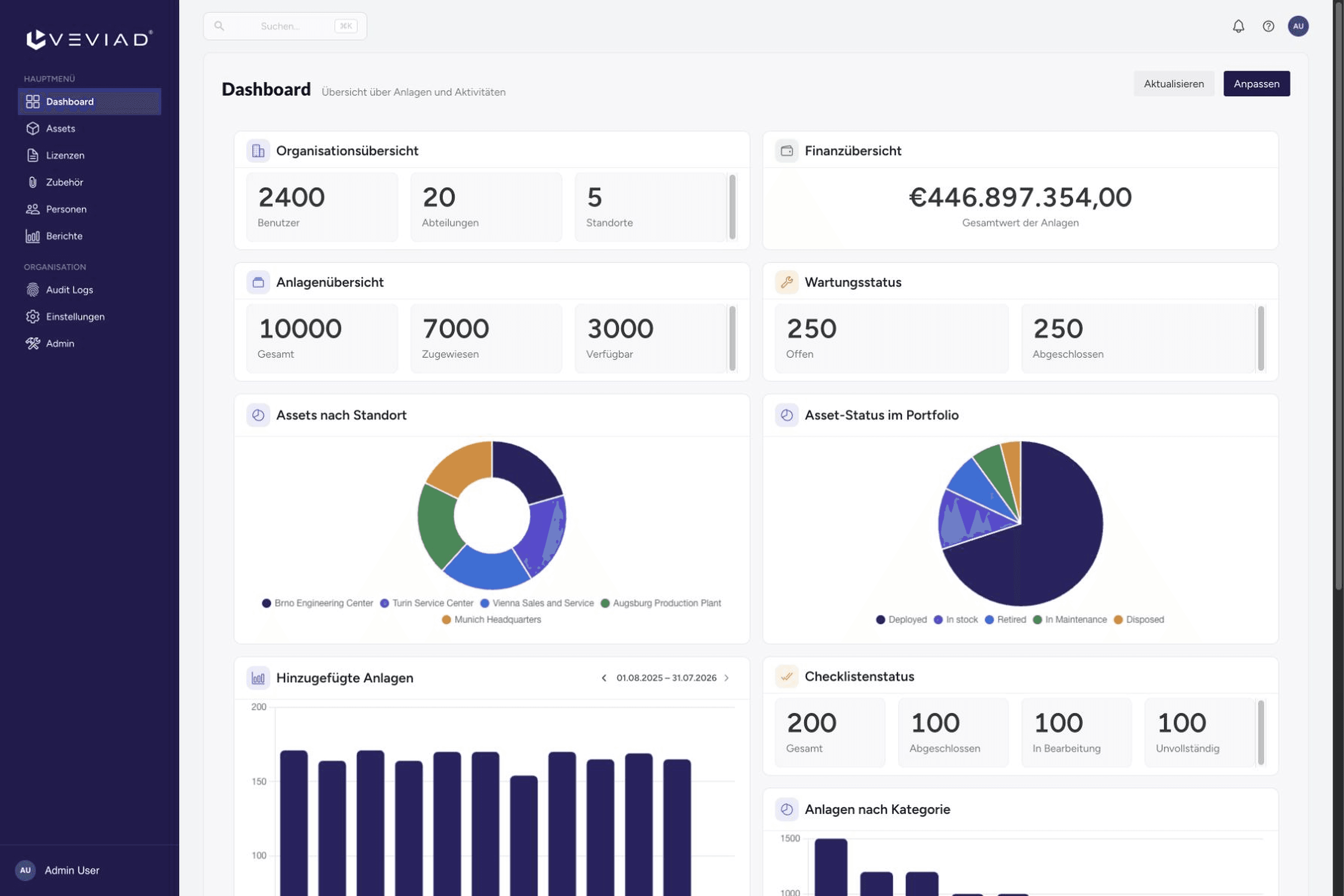
Dashboard with example data
Why Veviad
When IT, administration and finance keep separate lists, responsibility, handovers and book values need to be brought together. Veviad keeps this information, maintenance and history in the same asset record.
Instead ofPaper and spreadsheets
Handovers, checklists and relevant status changes stay with the asset. Find the records for each activity in one place.
Instead ofUnclear responsibility
Assign equipment to people, departments and locations. Confirmed handovers and returns record what was handed over.
Instead ofSeparate data sources
From purchase date and the latest handover to book value, IT, administration and finance use a shared asset record.
For your working day
IT, administration and finance need different information about the same equipment. Veviad brings their work together in one shared inventory.
Keep track of devices, furniture and equipment across teams and locations.
IT assigns a laptop to a new employee, then records its confirmed return against the same asset.
Operations and facilities teams see which equipment belongs to each location and who is responsible for it.
The finance team checks acquisition cost, cost centre and book value calculated using straight-line depreciation against the same asset record.
Assign shared equipment to departments, locations and the people responsible for it.
Municipal administration records which devices and furniture each department uses and who they are assigned to.
Schools and educational institutions document the issue and return of laptops, tablets and other equipment.
Social care and healthcare organisations assign equipment to their teams and plan maintenance within each asset record.
See the product
See how Veviad records handovers, asset history and book values.
The confirmed handover records who received the device and when.

Assignment, inventory audit, maintenance and invoice remain traceable in the same asset’s history.

Invoice, acquisition cost and straight-line depreciation appear alongside the book value. “Monitor” is the calculated status of the maintenance-cost comparison.

The platform
Register your assets once, then record assignments, maintenance and changes in the same place.
Organise assets by category, custom fields, location, department and cost centre. Search and saved views help you find them again.
From Growth
Plan maintenance and create checklists with required steps. Reminders stay within the asset record.
From Growth
Confirm assignments and returns digitally. PDF handover records and the asset history document the activity.
Use modular dashboards, reports with filters and charts, and CSV export. Reports can also be delivered by email.
Record acquisition details and track straight-line depreciation and calculated book values across the lifecycle of your assets.
Import and export inventory data as CSV. Configurable QR/PDF labels connect equipment to its record.
Getting started
Bring in your data, organise your equipment and use the inventory in your daily work. The setup assistant guides you through your organisation's essentials.
Prepare your inventory data as CSV and import it into Veviad.
Set up categories, locations, departments and cost centres. Decide who maintains your inventory data.
Label assets and keep assignments up to date. Handovers, maintenance and reporting stay connected to each asset.
Export your existing inventory lists as CSV and use the import template in Veviad. Review names, locations and assignments. Before importing, Veviad highlights missing or invalid information.
The setup assistant helps with your organisation’s essentials. Email and ticket support is available on business days. We discuss your requirements and open questions in the personal demo.
Decide who maintains the inventory in your organisation. Authorised users record assignments, location changes and status updates on the asset. IT, administration and finance then work from the same record.
Veviad AI
Use AI to answer inventory questions, analyse data with supporting evidence and charts, prepare asset drafts from PDFs and summarise activity and reports. The Model Context Protocol® (MCP™) also connects Veviad with compatible AI applications.
Ask questions about asset data and locations in a chat with read-only access.
Explore costs, book values, utilisation and asset age through analyses, charts and traceable supporting evidence.
Extract asset details from PDF invoices and delivery notes, then review the drafts before adding them to your inventory.
Get a concise overview of inventory activity, asset history and upcoming maintenance or warranty deadlines.
Choose the focus and language of your report summaries, with AI help suggesting a useful focus. You can also schedule report delivery by email.

Use your inventory, asset history and maintenance information in compatible AI applications through MCP (Model Context Protocol). With write access enabled, you can also create assets or report damage.
Security and deployment
Use Microsoft Entra ID, OIDC or SAML 2.0 for single sign-on. JIT and SCIM support automatic provisioning.
Set permissions at field and department level. Custom roles reflect your organisation's responsibilities.
Search and filter logged changes and actions. Export the audit history for review.
Use the managed cloud in Europe. Dedicated private environments or self-hosting are available with Enterprise.
Email and ticket support is available on business days (Europe/Berlin), with prioritised support as an option.
Each environment contains one organisation with clearly separated data. Export your asset data as CSV when needed.
Packages
Pricing depends on your asset inventory and the number of operators: users with elevated administration permissions. Employees use the included self-service features at no additional user charge.
Digital handovers and maintenance planning are included from Growth.
Core inventory management for small teams moving beyond spreadsheets.
Veviad Assistant available as an optional add-on
Request pricingControlled operations with maintenance, handovers, reporting, SSO and Veviad Assistant.
Veviad Agents optional at general availability
Request pricingScale with automation, reporting and governance.
Veviad Agents included at general availability
Request trial accessTailored deployment and service options, including self-hosting.
Scope and deployment agreed individually
Contact salesAll packages let employees use the included self-service features at no additional user charge. Contact us for a tailored quote.
Free Trial
14 days with the Professional product features in your own environment, with no payment details and no automatic renewal.
In your trial environment, the setup assistant guides you through the essentials.
Your Request
Your request goes directly to our team in Munich.
Personal demo
We present Veviad in a personal demo tailored to your requirements. Briefly describe your asset types and approximate count, your locations and the workflows you are interested in. This helps us prepare relevant product examples and arrange a time with you.
Successfully Submitted